Read summarized version with
The story of cloud servers used to be simple: same architecture, legacy support, backward compatibility, and years of optimization – x86 was (and still is) the standard for cloud infrastructure. But in 2018, things started to change once Amazon introduced their first ARM-based server CPU – AWS Graviton, promoted as “the most energy-efficient cloud chip yet.”
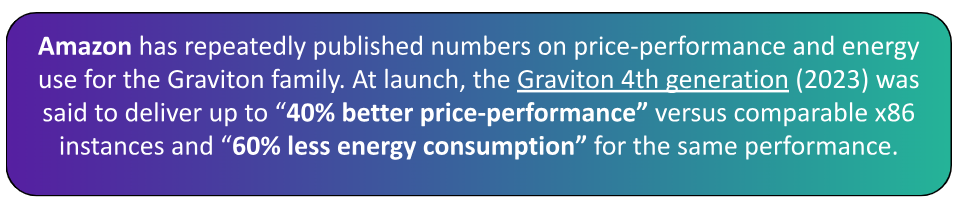
At the same time, x86 vendors keep upgrading server CPUs, pushing power and IPC improvements and publishing their own metrics. This means the gap in ARM’s benefits could be closing quickly by 2025, as Intel and AMD tune microarchitecture, system memory, and compiler/toolchain optimizations.
At Dedicatted, we decided to run our own test and make an independent AWS Graviton4 review through our own benchmarks, and direct competitor comparison. We wanted to know: “Does Graviton4 actually deliver those 40% of cost savings in 2025, and if so, under what workload conditions?“. But first, let’s take a closer look at the actual market differences between the 2 CPU architectures: ARM and x86.
ARM or x86 CPU for Cloud in 2025?
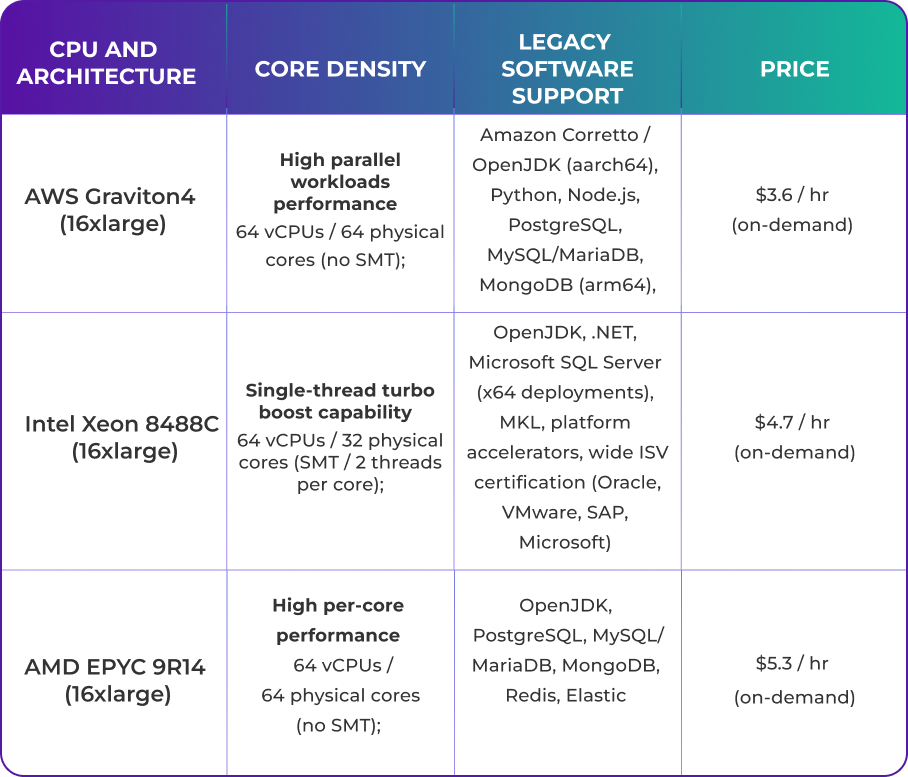
Today the enterprise cloud services market narrows down to 3 families you see everywhere: AWS Graviton (ARM), Intel Xeon (x86) and AMD EPYC (x86). Below we list the concrete advantages of the top models from each vendor.
AWS Graviton4
Graviton4 is built for density and efficiency: more useful cores per dollar and lower energy draw for scale-out services. AWS keeps expanding Graviton support across managed services infrastructure, so ARM-based software bottlenecks keep improving with each release.
Intel Xeon 8488C
Xeon is still the ‘safe option’ for workloads where single-thread speed matters the most. Latency-sensitive apps or older enterprise stacks usually “just work” on Xeon, without any porting issues. That’s the reason Xeon stays relevant even when cost-per-core isn’t the best.
AMD EPYC 9R14
AMD EPYC sits in a strong position too with higher per-core performance and memory bandwidth. This makes EPYC the go-to option for some heavy workloads (analytics, HPC, or big database servers).
Benchmarks: AWS vs Intel vs AMD
We compared 3 same-sized 16xlarge instances (64 vCPUs / ~512 GB memory): AWS Graviton4, Intel Xeon 8488C and AMD EPYC 9R14. Every processor was running Ubuntu 24.04, Linux 6.8 with identical storage class and networking tier for all instances to avoid I/O or NIC bias.
We ran performance tests using sysbench on the 3 instances to perform basic OLTP read-write tests. The very first results we got were surprising:
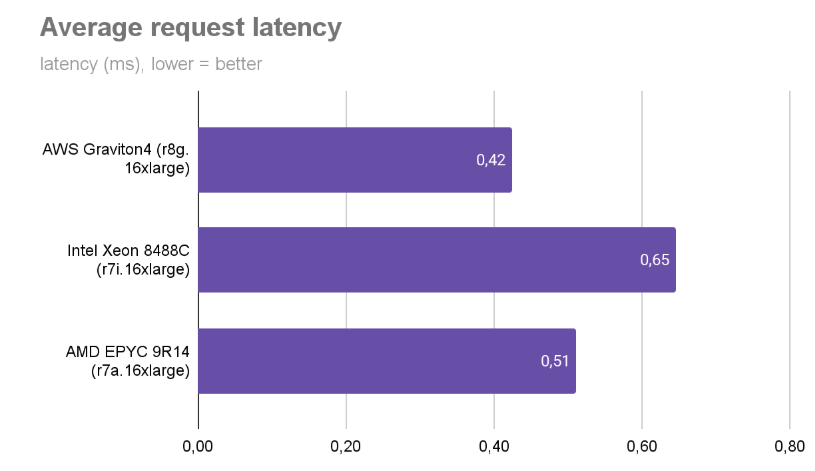
This chart shows the average latency under an OLTP workload. Graviton consistently comes out ahead: about 38% lower latency than Xeon and 20% lower than AMD EPYC.
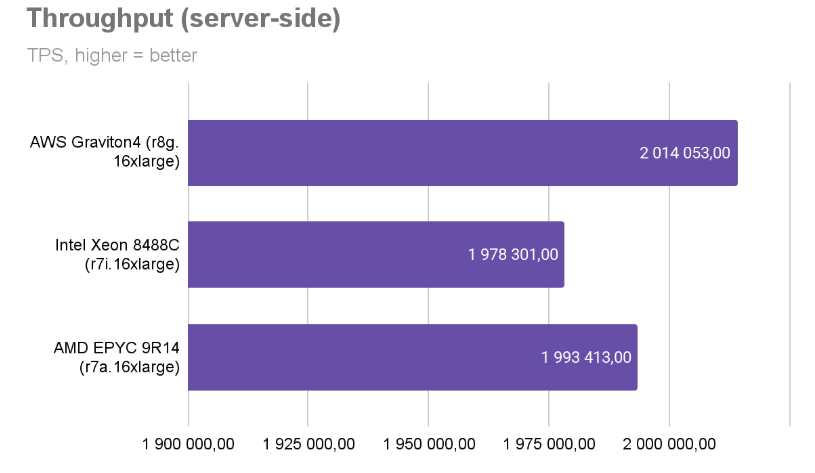
Both metrics (TPS & latency) were captured during fixed-length steady-state runs (200s throughput windows). Here, Graviton4 delivered roughly 13% higher than Intel and 8% higher than AMD for sustained transactional work.

Here we captured raw I/O/ops capability (random reads/writes) under heavy load (a proxy for datastore and cache headroom). AWS again sits ahead, but the gaps versus AMD are smaller here (memory, IO, single-thread speed change the picture).
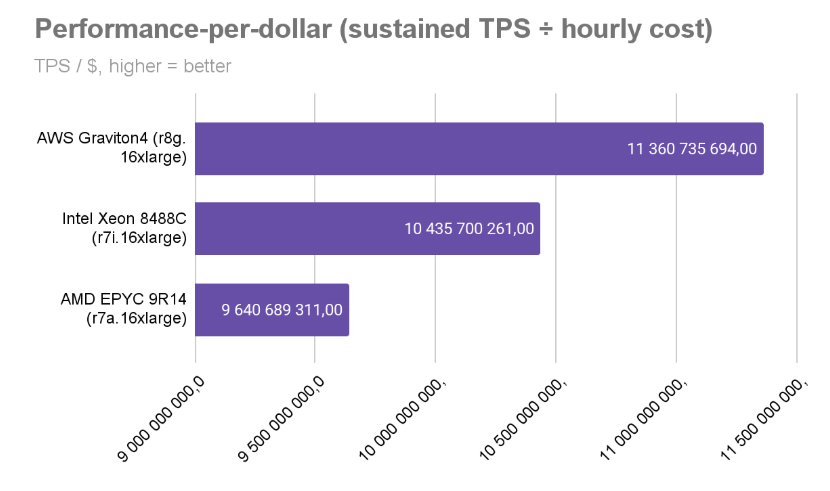
Finally, we converted throughput into a per-dollar metric by dividing sustained TPS by a normalized hourly cost (snapshot at the time of testing). The result is a normalized “TPS per $” that lets you compare cost directly.
AWS shows about 35% better value & performance versus AMD and 15% better versus Intel.
How to Choose the Graviton4 RDS Instance?
Does switching the server to ARM64 make any sense in 2025? Yes, Graviton4 architecture does justify the migration work with stable price/performance and energy-efficiency wins.
But the savings won’t magically appear unless you pick an instance that matches your workload profile. If you pick the wrong size (too little memory, wrong EBS/network footprint, or a workload that’s heavily single-threaded), you can actually lose TPS and money.
R8g is the most popular solution across AWS’s Graviton4 family. It’s the most memory-optimized CPU line (DDR5), tuned for DBs, in-memory caches and big data paths:
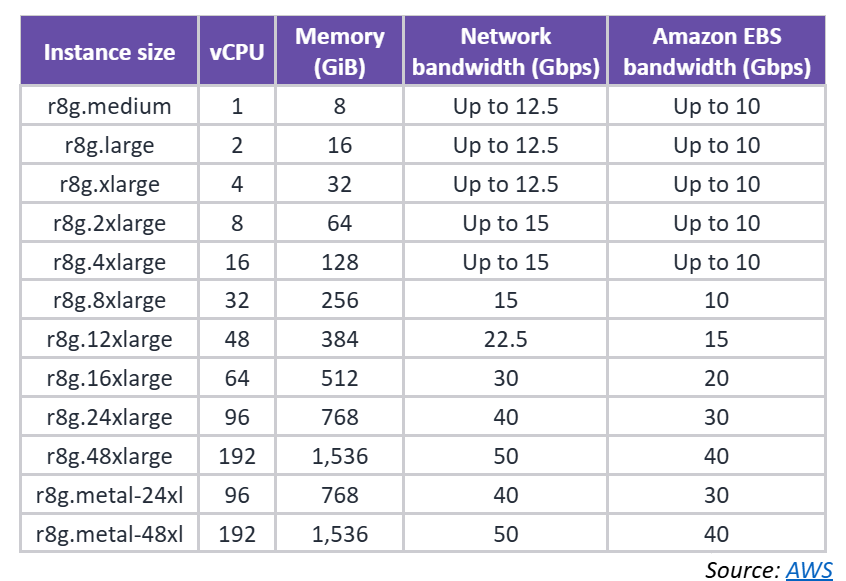
AWS also provides less popular instances: X8g (for high memory workloads); C7g (for compute-optimized tasks); and r8g.metal for hardware scale-up (bigger single instances) or scale-out (more instances) control.
What’s also important is the AWS cost-control toolkit (On-Demand, Savings Plans, Reserved Instances & Spot). Here you should choose the plan that fits your workflows. It often saves more than micro-optimizing instance specs.
What to Look at? RDS Instance Checklist
Before you cutover, run a production-like pilot and measure more than synthetic TPS: profile p99 latency, GC/CPU stalls, memory bandwidth and EBS/network behavior. Below are the factors that actually change the optimal instance choice:
• Memory Type & Bandwidth
For in-memory DBs and caches, DDR5 and higher memory bandwidth (what R8g exposes) materially improves tail latency and sustained throughput.
• Network & EBS bandwidth
Check expected network/TPS and EBS throughput. A NIC or EBS bottleneck will erase CPU gains. Use the instance bandwidth configs if you need to bias toward EBS or network.
• Binary / Dependency Compatibility
Verify critical native libs and drivers run on aarch64 (or are containerized). Managed services support for Graviton is growing, but double-check specific engine/plugin versions you use
• Pricing Commitment Strategy
Combine On-Demand for short/experimental runs with Savings Plans / Reserved for steady state and Spot for interruptible batch.
Ready to migrate? Dedicatted can help with the whole migration process, including:
- review of your current cost management setup;
- building a cost governance and implementation roadmap;
- running a Graviton4 migration pilot;
- technical assessment of your system architecture.
Let’s talk about how we can help you save on cloud expenses and get migrated to AWS products quickly.