Read summarized version with
Most AI demos are persuasive. That’s the problem. A confident answer to the wrong question is worse than no answer at all, especially when it’s going to a customer or feeding into a compliance review. RAG is the boring, citation-first plumbing that turns generative AI from a confident guesser into something you can actually defend in an audit.
Get this wrong at scale, and small retrieval errors don’t stay small – they compound into systemic risk. What looks like a harmless 2% miss rate can quietly cascade across thousands of queries, eroding trust, distorting decisions, and turning your AI from an asset into a liability.
This article explains what RAG is, how it works, where it creates real business value, and how to avoid the mistakes that derail most RAG projects. No PhD in machine learning required.
What RAG Actually Is
In plain English: RAG is a system that lets an AI look things up before answering your question. Without RAG, when you ask an AI a question, it generates an answer purely from what it learned during training, which is a fixed snapshot of public internet data. It cannot access your internal documents, product database, support tickets, or company wiki. If the answer requires that information, the AI will either refuse to answer or, worse, fabricate something plausible but wrong.
With RAG, the process changes fundamentally. When you ask a question, the system first searches your own data to find relevant information, then passes that information to the AI along with your question. The AI generates its response using your actual data as context. The result is an answer that is grounded in your specific business knowledge.
e the answer.
Think of it this way: without RAG, you are asking someone to answer questions about your business using only their general knowledge. With RAG, you are handing them your company’s filing cabinet and saying “use this to answer the question.” The difference in answer quality is dramatic
Core components of RAG evaluation
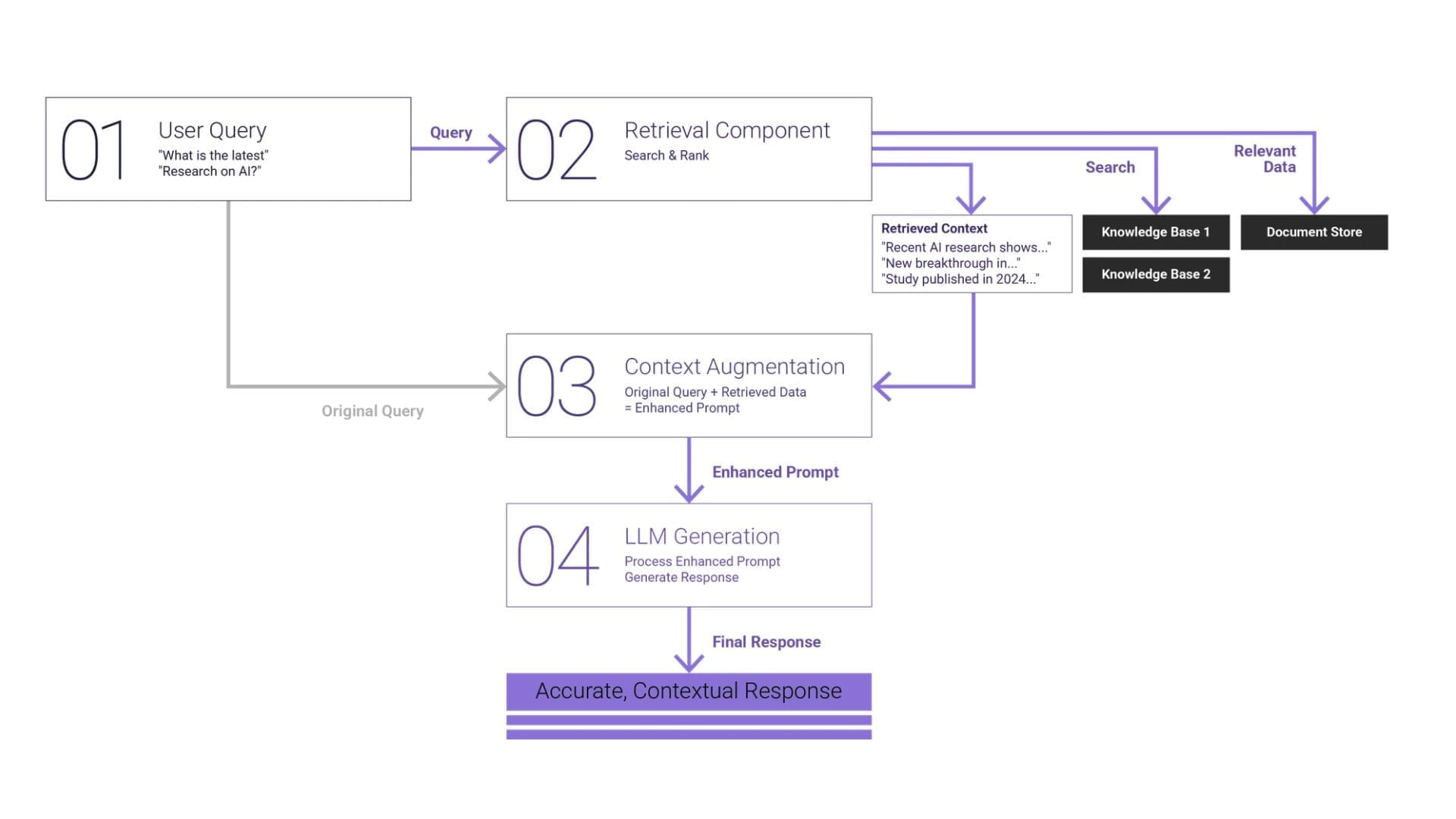
A rigorous RAG evaluation framework must examine both the mechanics of retrieval and the integrity of generation, as well as how both interact under real usage conditions. Measuring output fluency alone is insufficient. The evaluation must determine whether the system retrieves the correct evidence, uses it correctly, and delivers answers aligned with user intent and defensible against the source documents. Three core dimensions underpin such an assessment: context relevance, faithfulness, and answer relevance. Each dimension maps to a specific layer of the RAG architecture.
How RAG Works: The Four-Stage Pipeline
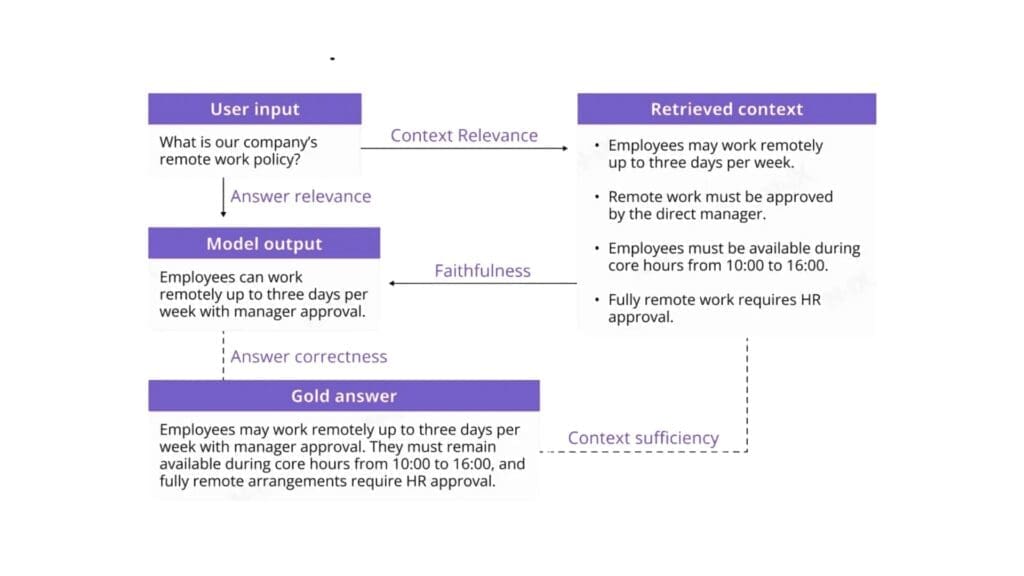
RAG systems follow a consistent architecture regardless of implementation. Understanding these four stages helps you make better decisions about building, buying, and maintaining a RAG pipeline.
- Stage 1: Document Ingestion and Chunking
Before your AI can search your data, that data needs to be processed into a searchable format. This starts with ingestion: pulling documents from wherever they live (SharePoint, Google Drive, Confluence, databases, PDFs, websites) and converting them into clean text.
Once you have raw text, it gets split into chunks. Chunking is the process of breaking long documents into smaller, meaningful segments. A 50-page product manual might be split into 200 chunks, each covering a specific topic or section.
Chunking sounds simple but it is one of the most consequential decisions in a RAG pipeline. Chunks that are too small lose context – a chunk that says “the warranty period is 24 months” is useless if it does not include which product the warranty applies to. Chunks that are too large dilute relevance – a 3,000-word chunk about an entire product range will match too many queries and provide too little specific information.
Most production RAG systems use chunks of 200-500 tokens (roughly 150-375 words) with some overlap between adjacent chunks to preserve context at boundaries. But the optimal size depends entirely on your data and use case. Product specifications need different chunking than customer support transcripts.
- Stage 2: Embedding Generation
Here is where the clever part happens. Each chunk of text is converted into a vector embedding: a numerical representation that captures the meaning of the text, not just the words.
Traditional search works by matching keywords. If you search for “return policy” it finds documents containing those exact words. Embedding-based search works by matching meaning. A search for “return policy” will also find chunks about “sending items back,” “refund process,” and “exchange procedures” , even if they never use the phrase “return policy.”
Embedding models like OpenAI’s text-embedding-3-large or open-source alternatives like BGE and E5 convert each chunk into a vector of 1,000-3,000 numbers. These numbers position the chunk in a high-dimensional space where semantically similar content clusters together. When a query comes in, it gets embedded using the same model, and the system finds the chunks whose vectors are closest to the query vector.
This semantic understanding is what makes RAG dramatically better than keyword search for question-answering. Users do not need to know the exact terminology in your documents. They can ask questions in their own words and still get relevant results.
- Stage 3: Vector Storage and Indexing
Those embedding vectors need to be stored somewhere that supports fast similarity search. This is the role of vector databases – purpose-built systems designed to store millions of vectors and find the most similar ones in milliseconds.
The main options in this space include Pinecone (managed, easy to start), Weaviate (open-source, feature-rich), Qdrant (open-source, performant), ChromaDB (lightweight, good for prototyping), and pgvector (PostgreSQL extension, good if you are already on Postgres).
For most implementations, the choice of vector database matters less than the quality of your chunking and embeddings. Start with whatever is easiest to integrate with your stack. You can migrate later if needed: the vector database is the most replaceable component in the pipeline.
- Stage 4: Query, Retrieval, and Generation
This is the stage that users actually interact with. When someone asks a question:
- The query is converted into a vector embedding using the same model that embedded your documents
- The vector database performs a similarity search and returns the most relevant chunks (typically three to ten)
- Those chunks are inserted into a prompt along with the original question
- The LLM generates a response using the retrieved chunks as context
- The response is returned to the user, ideally with citations pointing back to source documents
This retrieval step is what grounds the AI’s response in your actual data. Instead of generating an answer from general knowledge, the model is working from specific, relevant excerpts of your business documentation

Real Use-Cases
These are implementations delivering measurable value for businesses right now:
Internal Knowledge Base
Every organization has institutional knowledge scattered across wikis, documents, Slack threads, and people’s heads. A RAG-powered internal assistant lets employees ask questions in natural language and get answers drawn from across all these sources. New employees get up to speed faster. Experienced employees find information without hunting through dozens of documents.
A professional services firm with 200 staff and 15 years of accumulated documentation can see dramatic reductions in time spent searching for information. Instead of emailing three colleagues to find the right process document, employees ask the AI and get an answer with a link to the source document in seconds.
This approach mirrors what we implemented in our AI-powered document categorization solution for civil engineering firms, where vast amounts of technical documentation were previously siloed and difficult to navigate. By structuring and retrieving knowledge intelligently, teams significantly reduced manual search time and improved operational efficiency across projects
Customer support
RAG transforms customer support by giving agents and AI assistants – instant access to product documentation, policies, and historical interactions. Instead of relying on memory or switching between systems, agents receive context-aware answers in real time.
The impact is both operational and financial. In one of our implementations of a bilingual AI shopping assistant for Taw9eel, the system was designed to understand customer intent across languages and retrieve accurate product and order information. This led to faster response times and more consistent customer interactions, while reducing the load on human support teams. Across similar deployments, businesses typically automate 40-60% of inbound queries, allowing support teams to focus only on complex or high-value cases.ustomer a cleaner, more accurate answer.
Document Analysis
Legal, compliance, and finance teams spend a significant portion of their time searching through large volumes of documents. RAG turns this into a conversational process. Instead of manually reviewing hundreds of files, teams can ask precise questions and receive sourced answers instantly.
For example, in our work on AI-driven document processing and classification, organizations dealing with regulatory or technical documentation saw not only faster access to information, but also improved consistency in how documents were interpreted and used. In real-world scenarios, this reduces review cycles by up to 40% and minimizes the risk of missing critical clauses or inconsistencies.
Sales Enablement
Sales teams operate in high-pressure environments where access to the right information at the right time directly impacts revenue. A RAG-powered assistant connected to sales materials, product documentation, and case studies allows reps to ask questions like “How do we position against Competitor X?” and receive accurate, up-to-date answers instantly.
This is particularly powerful when combined with real case data. For example, in our cloud enablement and platform optimization projects, including our work for a global automotive enterprise , centralizing and structuring knowledge enabled teams to align faster on messaging, reduce internal back-and-forth, and accelerate decision-making. In sales contexts, this typically leads to shorter deal cycles and more consistent positioning across teams.
Common Pitfalls
Having built and reviewed numerous RAG implementations, these are the mistakes that cause the most problems.
- Wrong Chunk Size. This is the most common technical error. Chunks that are too small produce retrieval results that lack context. Chunks that are too large produce results that contain too much irrelevant information. There is no universal correct size – it depends on your content type and query patterns. Start with 300-400 tokens, measure retrieval quality, and adjust.
- No Evaluation Framework. If you cannot measure whether your RAG system is returning good answers, you cannot improve it. Build an evaluation set: a collection of questions with known correct answers drawn from your documentation. Run these regularly against your pipeline and measure retrieval accuracy (did it find the right chunks?) and answer quality (did the LLM use the chunks correctly?). Without this, you are flying blind.
- Hallucination Not Managed. RAG reduces hallucination dramatically compared to using an LLM alone, but it does not eliminate it entirely. The model can still misinterpret retrieved chunks, combine information incorrectly, or fill gaps with fabricated details. Mitigation strategies include: instructing the model to only use provided context, requiring citations for every claim, implementing confidence scoring, and having clear escalation paths when the system is uncertain.
- No Feedback Loop. The best RAG systems improve over time because they capture user feedback. When an answer is wrong or unhelpful, that signal should feed back into the system, flagging chunks that need updating, identifying gaps in documentation, and surfacing queries that the current knowledge base cannot handle. Without this loop, your RAG system’s quality is static while your business keeps changing.
- Ignoring Metadata. Raw text search is only part of the equation. Metadata – document dates, authors, product categories, document types enables filtering that dramatically improves retrieval quality. A query about “current pricing” should prioritise recently updated documents. A query about “Product X” should filter to Product X documentation before searching. Embedding metadata into your pipeline is low effort with high impact.
Build vs Managed
The build-versus-buy decision for RAG depends on your technical capability, scale, and customization needs.
Managed RAG Solutions
Platforms like Pinecone’s assistant API, LangChain’s hosted offerings, and various vertical-specific RAG products offer quick deployment with minimal engineering. You upload documents, configure basic settings, and get a working RAG system in days.
Choose managed when: you want fast time-to-value, your use case is standard (knowledge base Q&A, document search), you lack in-house AI engineering capability, or your document corpus is under 10,000 pages.
Custom RAG Pipelines
Building your own pipeline using components like LangChain or LlamaIndex for orchestration, a self-hosted vector database, and direct LLM API calls gives you full control over every stage. You can implement custom chunking strategies, hybrid search (combining vector and keyword search), re-ranking, query expansion, and domain-specific optimizations.
Choose custom when: you need non-standard chunking or retrieval logic, you have compliance requirements that preclude sending data to third-party platforms, your corpus is large or frequently updated, or retrieval quality from managed solutions is not meeting your standards.
For most businesses, the pragmatic path is to start with a managed solution, validate the use case, and migrate to custom only if you hit limitations that the managed platform cannot address. The worst outcome is spending three months building a custom pipeline only to discover that the use case does not deliver the expected value.

Best practices for evaluating RAG systems by Dedicatted
We evaluate RAG systems the same way we build them: systematically, with measurable criteria and full architectural transparency. The goal isn’t just to see if something works, but to understand why it works or fails under real conditions.
When something goes wrong in a RAG system, the first question is always: where? We isolate failure at the architectural level by evaluating embedding models, retrievers, rerankers, and generators independently before validating the full pipeline end-to-end. This allows us to identify the exact source of degradation instead of guessing.
Generic benchmarks rarely reflect real-world complexity, which is why we design domain-calibrated evaluation datasets. These include production, like query-context-answer pairs that capture actual user behavior, domain-specific language, edge cases, and multi-step reasoning patterns your system will face in practice.
A RAG system doesn’t fail in just one dimension, so we operationalize the RAG Triad in every assessment. We measure context relevance, faithfulness, and answer relevance together to determine whether issues stem from poor retrieval, incorrect synthesis, or misaligned responses.
Automation brings scale, but not always accuracy. That’s why we combine LLM-based scoring with expert calibration, continuously validating automated judgments against subject matter experts to eliminate bias and maintain evaluation integrity.
Optimization without control leads to noise, not progress. We run controlled, iterative experiments where only one variable, such as chunking strategy, embedding model, reranking logic, or prompt design is changed at a time, ensuring every improvement is measurable and attributable.
Security and robustness are not afterthoughts – they are built into the evaluation cycle. We test for prompt injection resistance, sensitive data leakage, adversarial inputs, and the system’s ability to safely refuse unsupported queries before anything reaches production.
A RAG system is not “done” at deployment. We integrate evaluation into CI/CD and observability workflows, continuously monitoring retrieval quality, groundedness, latency, token usage, and drift signals to catch performance degradation before it becomes a business issue.
RAG Cost Breakdown: What Actually Drives Spend in Production AI
One of the first questions you’ll face when moving a RAG system into production is simple: what does this cost to run at scale? The good news is that RAG doesn’t have a mysterious cost structure – it’s actually quite predictable once you break it down.
First, embedding costs are largely one-time. You pay to process and vectorize your knowledge base: documents, PDFs, tickets, etc. and that cost only repeats when data changes. In practice, even large knowledge bases (hundreds of thousands of documents) are relatively inexpensive to embed compared to ongoing usage. This aligns with what Accenture highlights: the upfront effort is less about cost and more about data readiness and structuring.
Second, vector database costs behave like a steady infrastructure layer. Whether you use managed services or self-hosted solutions, you’re typically paying a predictable monthly cost for storage, indexing, and retrieval performance. For most mid-sized use cases, this sits in the range of tens to a few hundred dollars per month, scaling with data size and latency requirements – not with the number of queries.
The real cost driver and where your CFO attention should go is query cost. Every user question triggers multiple steps: retrieval (sometimes multiple queries), optional reranking, and LLM generation. These are billed per token or per request, which means cost scales linearly with usage. As Deloitte describes through the concept of tokenomics, this usage-based pricing becomes the dominant factor at scale, with typical enterprise workloads falling in the range of $0.01 to $0.30+ per query depending on model choice, context size, and response length.
What makes this non-trivial is how quickly it compounds. A system handling 1,000 queries per day might cost almost nothing in the context of an IT budget. The same system at 100,000 queries per day becomes a six-figure annual line item if left unoptimized. Strategy& emphasizes that this shift toward consumption-based pricing fundamentally changes how AI systems should be designed: unit economics matter from day one.
This is why practical optimization decisions have direct financial impact:
- Chunk size and retrieval quality affect how much context you send to the model (and therefore cost per query)
- Model selection (e.g., smaller vs. larger LLMs) can change costs by 5-10× for the same use case
- Caching frequent queries can reduce repeated generation costs significantly
- Reranking strategies can improve accuracy without always increasing token usage if applied selectively
- Answer length control (concise vs. verbose outputs) directly reduces generation cost
In well-architected systems, these levers can reduce per-query cost by 30-70% without sacrificing quality.The organizations that scale it successfully are the ones that track cost per query, cost per answer, and cost per user as core metrics alongside accuracy. That’s the level where technical design and business value finally meet.
Where to take it next
Anyone can spin up a RAG demo. Making one that holds up in production – accurate at 2 a.m., fast under real traffic, secure under audit, and affordable at the end of the month is where the real engineering begins. That’s the part most teams underestimate. It’s also the part we love.
At Dedicatted, we build RAG systems that earn their keep. As one of the top 2% of AWS partners worldwide and the only AWS GenAI and MSP partner in Canada, we work where the serious AI workloads live: Amazon Bedrock, Kendra, OpenSearch, SageMaker, S3, Lambda, and Amazon Q for Business and we tune every layer to your data, your latency, and your compliance reality.
Ten years in, 300+ projects delivered, a 93% client return rate, and SOC 2 + ISO 27001 on the wall. Our Amazon Q for Business deployments have delivered up to 300% ROI, not because we got lucky, but because we sweat the details across Generative AI, Agentic AI, and Data Architecture.
So if your RAG pipeline is ready to graduate from “interesting prototype” to “indispensable business asset,” let’s talk. Bring the data – we’ll bring the architecture, the AWS firepower, and the team that’s done it before.