Read summarized version with
About project
Working time:
2025-2026
Industry:
Manufacturing
The service:
Agentic AI, Generative AI
Overview
A manufacturer came to us about software that almost nobody in the building could use properly.
The system was not bad. It was old, and it was theirs: years of accumulated operational logic covering scheduling, inventory, quality records and reporting, built up over a long life and still running the plant every day. Most of the people who designed it had moved on. The people using it had been handed it and told to get on with it.
Documentation existed, and it was reasonably good. Almost nobody opened it, because nobody abandons a half-finished task to go and read.
Rather than rewrite the documentation or rebuild the interface, we embedded UniGuide, an AI product expert, directly into the software. It answers strictly from the company’s own verified material, walks the interface on the user’s own screen to show where to click, and asks permission before doing anything on their behalf.
The Challenge
Long-lived operational software fails in a particular way. The problem is rarely that it works badly. It is that most of what it knows lives in the heads of a few long-serving people, and everybody else navigates by memory and guesswork.
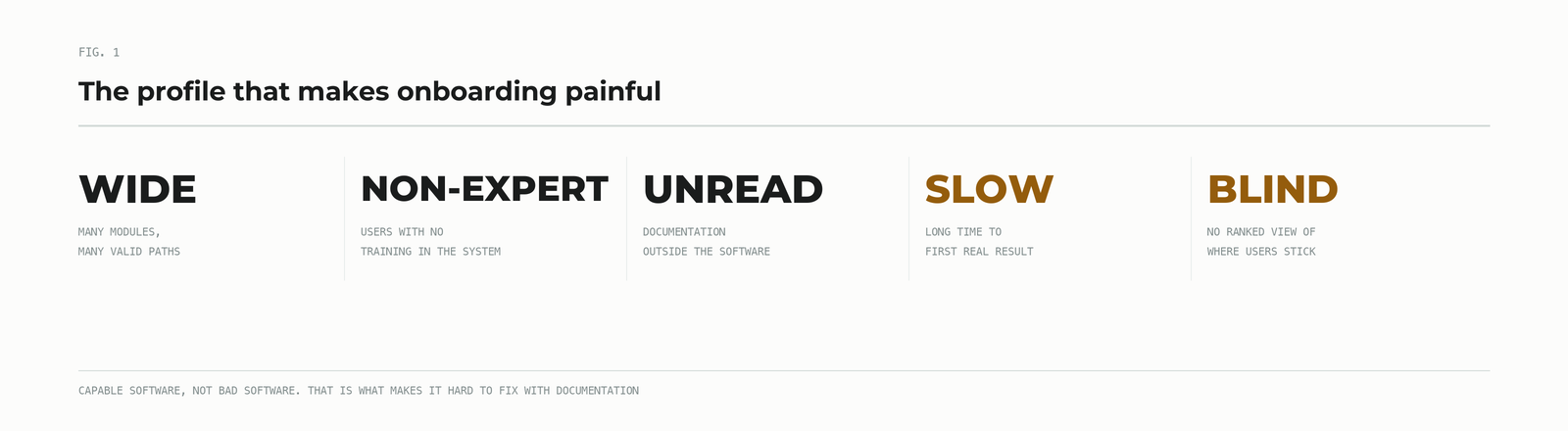
- Wide surface area. Many modules, many settings, several valid routes to the same outcome. Power for someone who has used it for a decade, a maze for anyone who has not.
- Users with no training in the system. The people logging in were not specialists in the software. They often did not know the right question to ask, let alone where to click.
- Documentation nobody read. It existed and it was decent. It also sat outside the software, which is the one place people will not go while they are mid-task.
- Knowledge concentrated in a handful of people. Every non-obvious answer routed to the same few long-tenured staff. That is a continuity risk as much as a support cost.
- Records that have to be right. The system holds operational and quality records where a confident wrong answer costs real time, and occasionally more than time.
- No view of where people got stuck. The team knew onboarding was hard in a vague and unsatisfying way, without being able to say precisely where.
Every proposed fix ran into the same wall. Rewriting the documentation leaves it outside the product. A guided tour works for the first five minutes, then breaks the moment somebody asks what the script did not anticipate. Hiring more support pays for the problem rather than solving it.
Technology & Approach
We embedded UniGuide, an AI product expert, directly into the interface of the existing system. No rewrite, no replatform, and no change to how the software works.
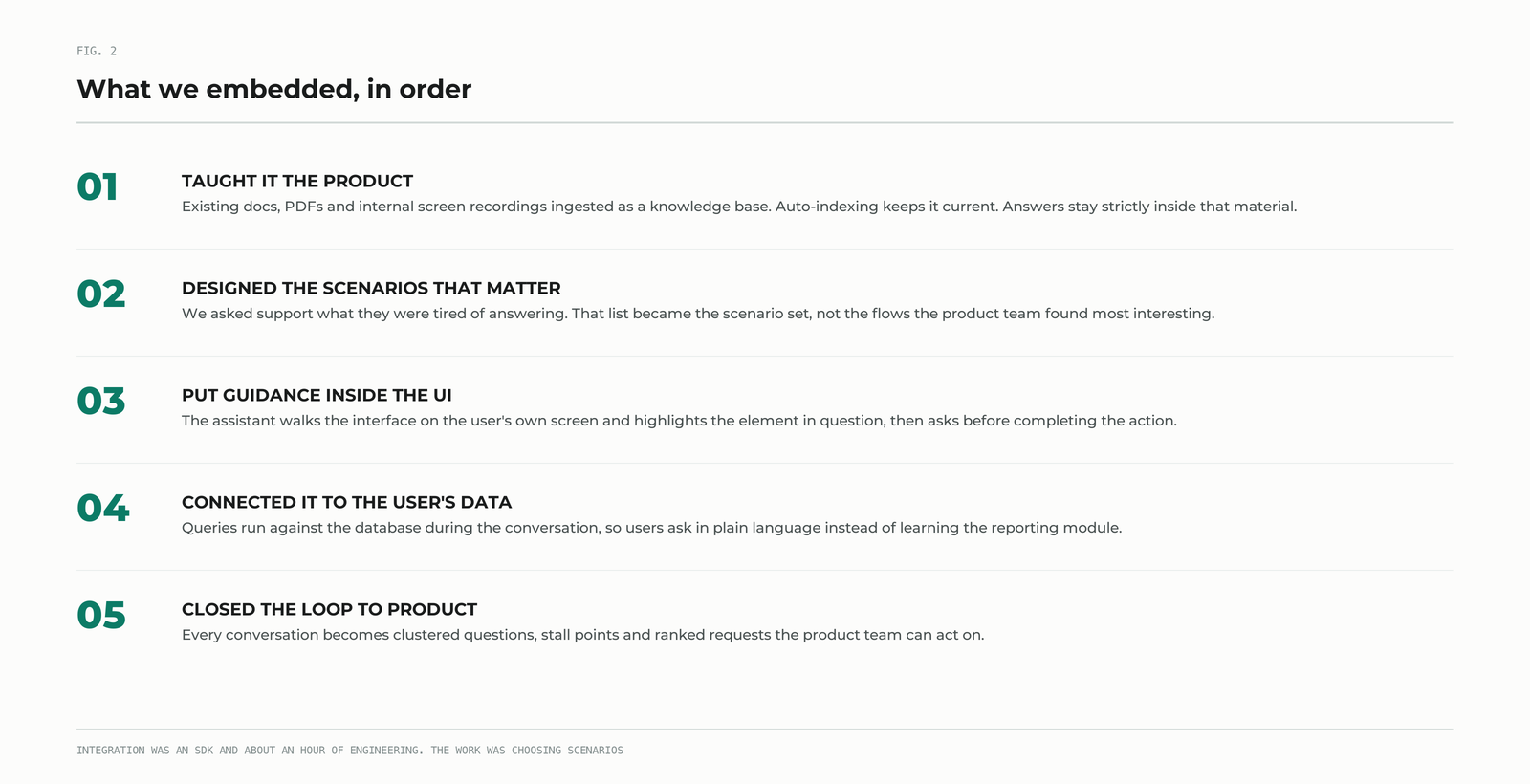
1. We taught it the product
The existing documentation was not useless. It was simply in the wrong place. We ingested it as a knowledge base together with PDFs and screen recordings the team had made for internal training. Auto-indexing meant that when documents were updated afterwards, the assistant picked up the changes without anyone maintaining a second copy.
The important constraint: the assistant answers strictly from that verified material. Asked something outside it, UniGuide says it does not know. On a system where a confident wrong answer can cost an operator real time, that boundary mattered more than breadth.
2. We designed the scenarios that actually matter
We ran a workshop with the client’s support and operations people and asked a blunt question: what do people ask you, over and over, that you are tired of answering?
That list became the scenario set. Not the flows anyone found most interesting, but the ones consuming the most human hours. It is a better prioritisation method than it sounds, because a support queue is an honest record of where software fails to explain itself.
3. We put the guidance inside the interface
This is the part that separated UniGuide from anything the client had tried. Rather than describing a path in prose, the assistant walks the interface: it navigates, highlights the element in question, and moves through the steps in order. The user watches it happen on their own screen, in their own account, with their own data.
When the action is one UniGuide can perform, it asks first. Users keep control, which mattered a great deal on a system holding records the business cannot afford to get wrong.
4. We connected it to the user’s own data
Some of the most common questions were not about the software at all. They were about the user’s own information, the kind of thing that normally requires knowing which report to run and how to filter it. UniGuide can run queries against the database during a conversation, so somebody asks in plain language and gets the answer without learning the reporting module first.
5. We closed the loop back to the product team
Every conversation became structured data: questions clustered by topic, points where users stopped making progress, requests for things that did not exist. The team went from a vague sense that the software was hard to a ranked account of exactly where people got stuck and what they asked for next.
Business impact
This engagement was not set up as an instrumented before-and-after study, so what follows is what the client’s team and ours observed rather than a controlled measurement.
- New users got somewhere faster. Instead of reading, asking a colleague, or filing a ticket and waiting, people asked and kept working. The gap between not knowing and knowing collapsed to a single question.
- The repetitive tickets stopped arriving. The educational requests that were never really support work were answered before anyone thought to open a ticket, which freed people who understood the system deeply to work on problems that needed them.
- The knowledge stopped living in a few heads. The answers those long-tenured staff had been giving verbally now sat in the software, available to everyone, at the moment of use.
- The team finally got visibility. Not page views, but a ranked account of what people tried to do and where the software failed to make it obvious. Several roadmap decisions came directly out of that list.
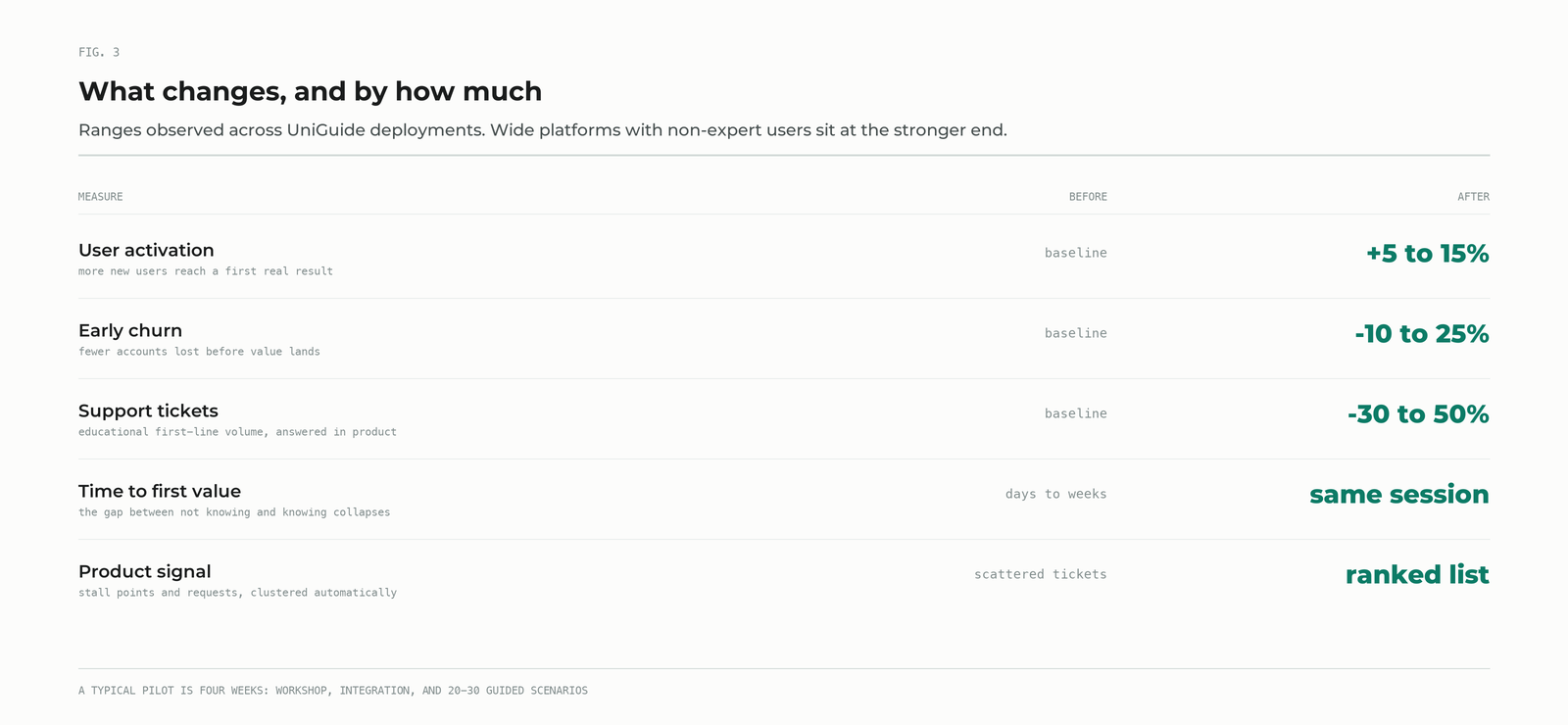
For context, across UniGuide deployments generally, we see activation improve by 5 to 15%, early churn fall by 10 to 25%, and support tickets drop by 30 to 50%. Systems with the profile described here, wide functionality and non-specialist users, sit at the stronger end of those ranges because they have the most ground to make up. Those figures come from our deployment base as a whole; they are not measurements from this client.
What transfers
A few lessons from this engagement apply well beyond it.
- Your support queue is your onboarding roadmap. The questions your team is tired of answering are the scenarios worth automating first. Start there rather than with the features you most want to show off.
- Documentation is rarely the problem. Location is. This client’s docs were fine. They were simply somewhere nobody would go mid-task. Moving that knowledge into the moment of use changed the outcome without rewriting a word.
- “I do not know” is a feature. Where users lack the expertise to spot a wrong answer, an assistant that refuses to guess earns trust faster than one that always has something to say.
- Ask before acting. An assistant that can complete tasks is far more useful than one that only explains. An assistant that completes tasks without asking is a liability. The permission gate is what makes the capability usable.
- Age is not the obstacle people expect. The software was old, and integration was still an SDK and about an hour of engineering time. The real work was deciding which scenarios mattered and validating that the answers were right, and that work belongs to the people who know the system.
What comes next
If your software has the same shape, capable, wide, and harder to learn than you would like, the fastest way to judge whether this approach helps is to use it. We publish a working demo on AWS Marketplace: UniGuide by Dedicatted deploys into your own AWS account through a CloudFormation template, with a live assistant embedded in a sample application. A typical pilot runs 4 weeks: a joint workshop, integration, and 20 to 30 guided scenarios. It runs inside your own perimeter, so your data stays in your account and you own the resulting code.


